
Model Railway Track Testing Monitor

My local Model Engineering Society is very conscientious regarding the maintenance of the club running tracks. We have both ground level (7.25″) and a combined raised track for 2.5″, 3.5″ and 5″ gauge running.

The Society has decided to upgrade the support structure on the raised level track. The old wooden beams will be replaced with new plastic decking board based structures.

The upgrade is for the full length of the track (1361ft/ 415m) and will be a major over winter activity. Once the rails have been re-fitted to the new supports there will be a need to make sure the track bed is correctly aligned to match the geometry of the new support structure and the route curvature and banking.

Some while ago DroneBot posted a video about using an Inertial Measurement Unit (IMU) with an Arduino to create an electronic spirit level. This struck me as being a potentially useful device that could be enhanced for measuring track characteristics. My idea was to check the existing 5″ track profile so we had a reference before the upgrade. Once the upgrade is completed, the same measurement run could be made to help to speed up alignment.

A prototype unit was based around an Arduino Uno. The Arduino code has edits to provide additional LED ‘bar graphs’ and a sensitivity adjustment. The circuitry was accommodated on a bespoke hardwired Shield connected to the IMU. The prototype unit appeared to work very well so a more engineered version followed with a 3D printed enclosure and professional PCB both of which were designed in Fusion.

Mission creep alert …. I decided to add a GPS facility so the readings around the track could be logged. I added an OLED display and also a memory card facility to record the results for future reference. The code runs on a Seeed Xiao. The GPS unit was housed in a separate 3D printed enclosure and connected via a three wire interface cable. A 3D printed battery holder for a 12V battery completed the installation. The GPS unit takes the slope and tilt information and adds this to the displayed data. Here are Fusion graphics of the LED shield that plugs into the UNO and the GPS receiver and display.

A surplus to requirements bogie was found in the club carriage shop. This had significant mass to make a stable measurement platform. The tilt meter, GPS unit and battery pack were mounted onto the bogie and for further visual cross checking a bubble level gauge was included. Here are some images (wet images …)
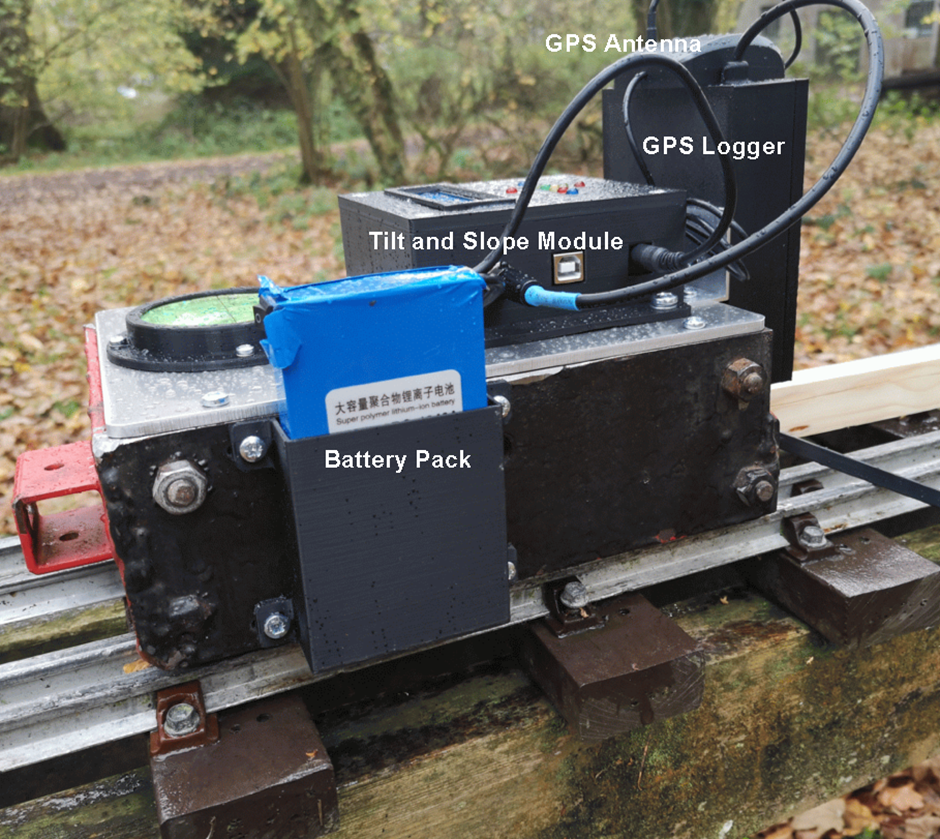
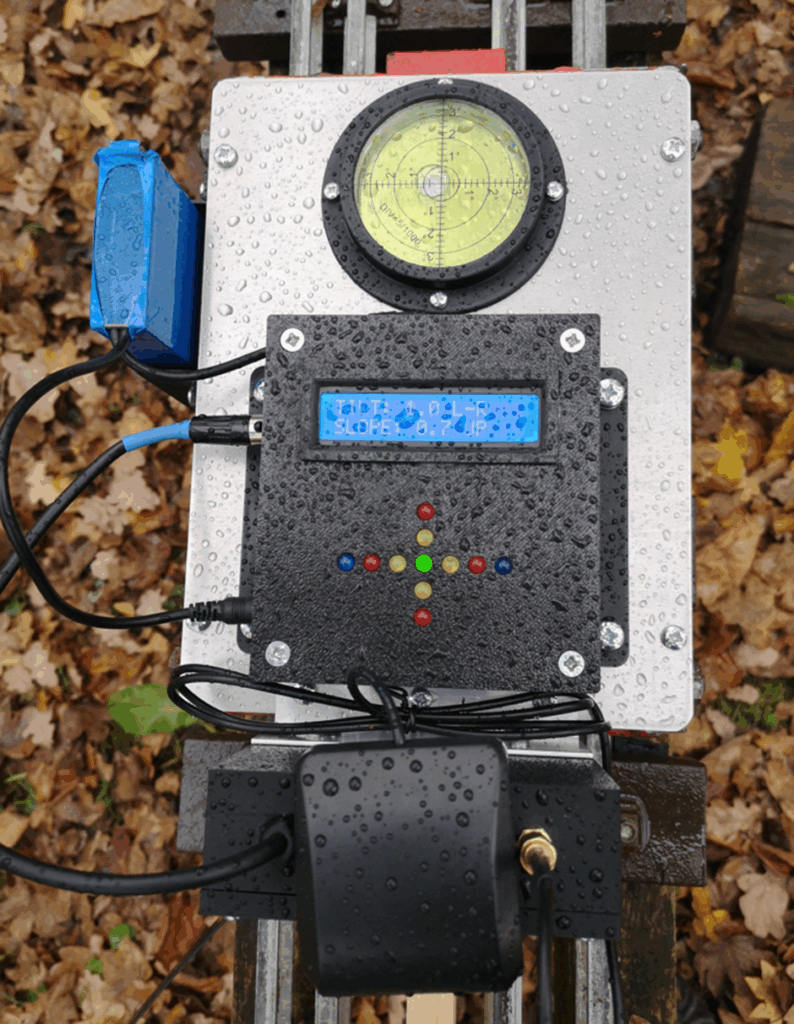
Here is the GPS unit OLED readout
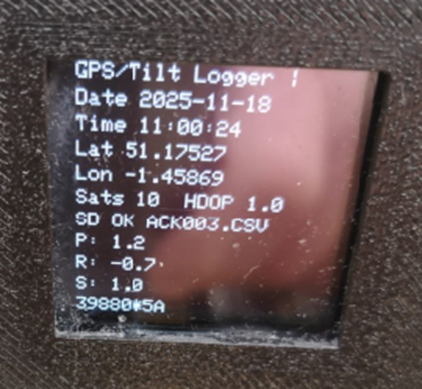
A couple of runs (actually very slow walks) were made around the track. The logged results were very impressive and highlighted one or two suspect cambers on the track. Using an App called GPS Visualizer it was possible to take the logged results and superimpose them as a snail trail on Google Earth. Visualiser also colour grades the results to provide a more obvious display of the track variations.
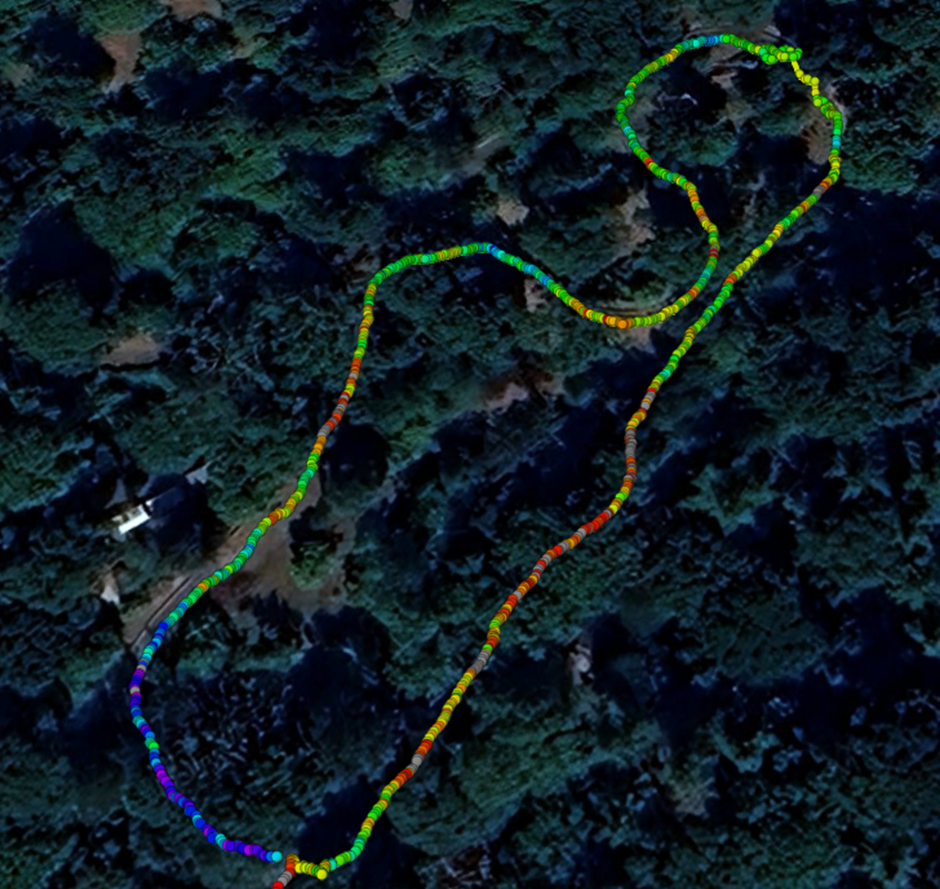
This has been an interesting and useful project. It might be of use to other clubs needing to check track characteristics. I have ordered a batch of PCBs for the LED display Shield and for the GPS logger from PCBWay. Let me know if these boards and the associated Arduino code are of interest.

Links to similar or related post are listed below : –

First experiences using ChatGPT for Arduino code

Some thoughts from a very basic self confessed cut and paste Arduino code writer.

In the course of creating a recent Arduino based project a collegue suggested trying ChatGPT. A resource that I really wasn’t sure how to use.

ChatGPT is among many other things, a web based AI code writing resource. In simple terms, you tell it what you are trying to achieve, what hardware you have available and it will, very very quickly deliver code that will satisfy the requirement.

It is not perfect. ChatGPT is only as good as your ability to describe exactly what you want to happen and what the hardware being used is and what the interconnections are. In short the output result is only as good as the input data. It is still likely to be ‘not quite there’ and needs you as the client to try the code and clearly describe and feedback what is happening in the hardware so an iteration of the code can be created ….and then you go round the loop again.

It is all a bit surreal.

You are talking with a machine somewhere in the web infrastructure that you cannot help but give a human personality to. You get all the niceties of ‘Hello’, ‘Bye for now’ etc which adds to this humanisation. It becomes a partnership where the AI source does all the grunt code bashing and you become the project leader directing, testing, evaluating and feeding back.

Some might regard the process as ‘cheating’. My father always impressed on me that if a machine can do something as well or better than a human then a human should not be doing it. I believe this is the case with AI. It is a power to be harnessed to do the donkey work of writing the code while the human directs and assesses the result. The more the human can interpret the code the more successful the partnership and the more efficient the time to success of the project. My coding understanding has improved and anything that I do not understand can on request be patiently explained by my AI friend. It’s nice to be able to ask dumb questions and not be ridiculed by some forum ‘know it all’.

I can also see a looming revolution in the software industry and understand why current code writers are looking nervously over their shoulders with a great deal of discomfort and concern. My feeling is that we should grasp having a partner that can crunch all the boring dross code writing which would take a human hours to do. Instead we should step back and become project managers with intelligent direction and control of the AI source.

I have also found one aspect of a ChatGPT partnership that must be monitored and controlled – mission creep. My AI friend is constantly in need of a handbrake to stop or at least slow the avalanche of code creep that can potentially ensue. Lots of ‘it would be easy to add …’ conversations crop up which need firmly resisting until the core of the project is stable and running to plan.

All that aside I am now able to fulfill Arduino based projects to a level I never could before and with a complexity that I will never be able to fully understand. To me, ChatGPT is a very powerful partnership but with the old caveat of ‘rubbish in rubbish out’.

Links to similar or related post are listed below : –

I had a ChatGPT experience

I am currently working on a timing synchroniser for the local church clock. Being of that generation I had come up with a CMOS based phase detector with monostable timers etc. This logic looks at the relative timing of the clock strike activation and a DCF timecode reference clock. I prototyped the circuitry, proved it and made a PCB for it in Fusion. It works very well and the resulting output slows or speeds up the clock by adding or removing lead shot to the weight tray on the clock pendulum.

I got my ear bent for being so old school and not using an Arduino or similar but I was reluctant to stray from known and proven simple logic with RC time constants. In the end I caved in and out of curiosity thought it might be a good project to get my feet wet with ChatGPT.

It took a little while to find my way round the ChatGPT site and to get to the software support section. Once there I entered in simple language what I was trying to achieve. ‘It’ replied with its understanding of my needs and I agreed this was correct. I then asked for some code for an Arduino UNO.

Out popped 44 lines of Arduino code …. which worked. Oh my goodness, what a revelation. Think I need to have a cup of tea and biscuit to recover. Like Fusion and 3D printing, this is going to completely change my workflow and project practices.

Links to similar or related post are listed below : –

Arduino Processor Reference Clock Accuracy

Of late I have been going round in circles on a project to keep our local church clock roughly on time. I say roughly as my idea of timekeeping does not accord with the aspirations of the village residents. Quote ‘ I only need to know when it is the time to go inside for a brew’ / ‘knock off for the day’ / ‘get my skates on or I will be late for work’ etc. I was thinking sub seconds and they were thinking a minute or so as being perfectly adequate. The exception is at 11am on the 11th of November when it has to be exact.

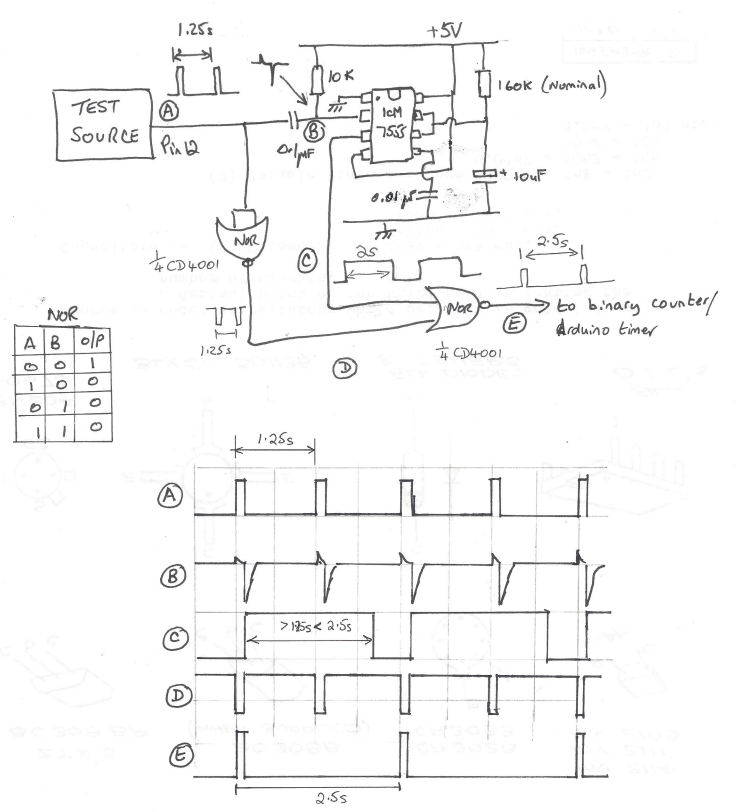
That as it may be, the project is moving along. The first problem was what to measure on the clock to reference the time adjustment. The pendulum (1.25s rate) is clearly the easiest choice and a sensor beam being broken by the pendulum swing will solve this problem. The slight problem is that the sensor will not necessarily ‘switch’ at the same time when being approached from the two directions of the pendulum swing. My Arduino skills might struggle to come up with some code to discriminate this so I reverted to simple CMOS logic. An ICM7555 acts as a monostable that has a period greater than one swing. This is triggered by the falling edge of the swing pulse derived from a simple differentiator network. The monostable extended period pulse is then gated with the incoming pulse using a CD4001 Quad NOR to always give me half the pulse rate regardless of the swing direction. That probably makes no sense at all so here is my back of an envelope waveform diagram and circuitry.

The circuit has turned out quite useful for other applications. I also refined it to have a CD4024 ripple counter fed from the output at E. This allowed extended logging periods to be achieved. I also utilised the unused gates on the CD4001 to provide an isolating buffer on the input signal. This meant the differentiating network would always see the same drive signal regardless of the incoming waveform and its source impedance.

Progress indeed. I now had a pulse train representing the clock beat period. All I had to do was measure the time taken between pulses and I could compare and adjust the pendulum rate.

Having got a reliable 2.5s pulse it was time to reverted to an Ardiuno UNO to measure the period. With some help from a friend we ran a sketch using millis to record the time between pulses. This minimalist sketch did not seem all that repeatable. I also did some tests with Frequency.h sketch code from the PJRC website (very useful source) and had similar poor results. I was using a FY6900 as my reference 1.25Hz signal and to get a 1.25Hz reading I had to offset the FY6900 quite a way from nominal. What to believe?

In a bid to get a known good reference I powered up my Arduino GTU-7 GPS module and measured the 1 second output pulse using both of the above sketches and the results were not much closer to the truth. I tried an Arduino MEGA instead of the UNO and got a different set of inaccurate results

This led me to think that the UNO and the MEGA must be the cause. Looking at these two boards, both have a 16MHz crystal which I (foolishly) believed was the processor reference and therefore could not be that much off frequency. Totally wrong. The crystal is for the USB interface, not the processor. Instead the processor has a basic 16MHz resonator – not a crystal. I got out the magnifying glass and discovered this piece of surface mounted wizardry. Low and behold if I put my finger on the resonator to warm it up, off it went into dodgy stability land. It was pretty awful. I could make my readings whatever I wanted them to be just by timing how long my finger was in contact with the surface mount resonator package. Chocolate fire guard indeed.

What to do ?

I downloaded the ATmega258P datasheet and found that I could replace the resonator with a crystal. This looked complicated with references to fusible links and reprogramming of the processor all of which made me twitch. The processor had been running on a wobbly 16MHz source so why not a less wobbly one?

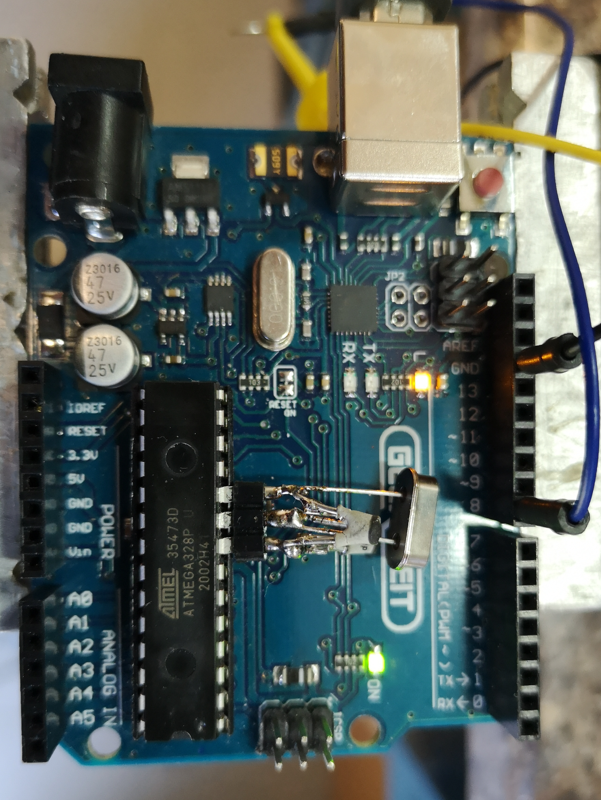
Rather than hack the UNO board, I eased the processor out of its socket and bent pins 8 (ground),9 (xtal) and 10 (xtal) out horizontally and plugged the processor back into its socket. Using a three pin socket pushed onto the pins as a mounting, I assembled the crystal across pins 9 and 10 and two shunt capacitors (approx 33pF) to the ground pin. The crystal came from RS Components (#8149440) and was a 30ppm spec. This socket mounted lash up was then pushed into place on the floating process legs – very healthy, no damage done to the processor or the board. Here is the ugly mess.

Switched on. It worked.

Suddenly all my test source readings took on a very stable repeatability and the readings were very close to what I expected. The GPS referenced 1s pulse was reading 0.999936 and my SY9600 was reading 0.999958. It looked like my new crystal reference must be slightly off frequency but a tweak of the shunt capacitor values will fix this. I think the SY9600 has a 10MHz TCXO so it should be good but I think I tend to believe the GPS pulse as being more accurately delivering a 1Hz rate.

The experts will tell me I should be adjusting the fusible links but I am inclined to stick with what I have got, it is working.

The result is I now have an ability to measure the pendulum rate and from this I can derive an advance and retard flag.

I am currently designing the front end circuitry as shown above into a PCB ‘shield’ to plug into the UNO. This will take the sensor input and give a slow or fast command pin output. More on this and general progress to follow.

Update (30/9/2024)

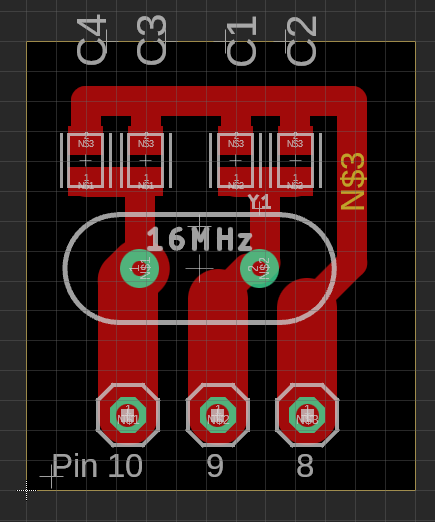
I changed the two crystal oscillator shunt capacitors to be a 22pFSMD in parallel with 1p8 caps when using the RS crystal as mentioned. Below is a suitable layout for the crystal and shunt caps. There are positions for two caps on each leg of the crystal. 15pF in parallel with 6.8pF would also work. I checked the frequency was close using a GPS derived 1pps signal feeding pin 8 on the UNO while running the frequency.h demo sketch.

The board can be connected using the mounting holes or it can be cropped and the residual pcb tracks used as direct connections using pins 10 and 9 both of which are bent out from the IC body. Pin 8 was left plugged into the IC socket and bridged and soldered across with a wire clipping to the crystal board. The crystal mounts on the rear. The board is so simple you could mill it on single sided copper clad with a burr in a Dremel.

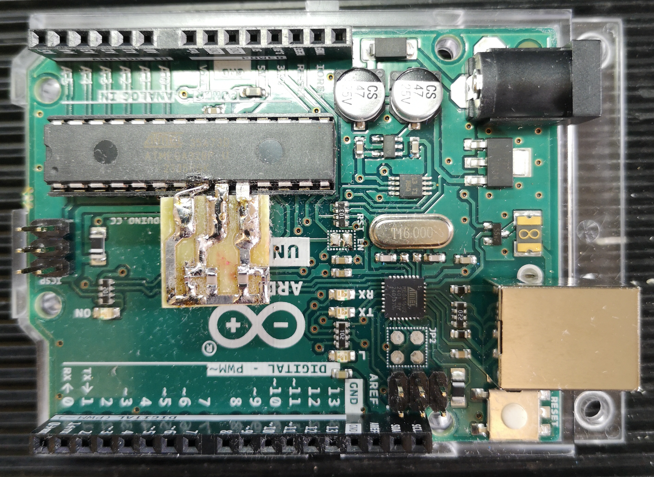
The picture below shows the first milled version in place on the UNO. The layout above is a later tweaked version to better match the pcb pads to pins 9 and 10.

Links to similar or related post are listed below : –

Dewpoint alarm monitor to help avoid rust issues in the workshop

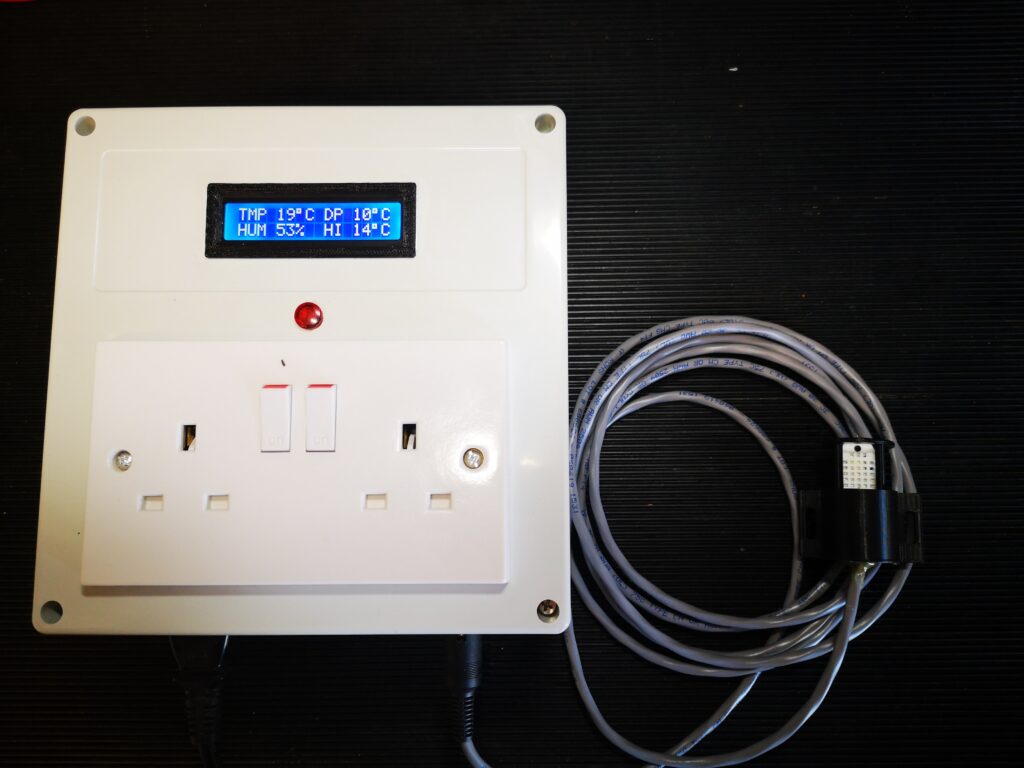
A Dewpoint Monitor to protect the workshop

I have recently read a number of posts on workshop forums about rust degrading workshop assets.   When the temperature of the air reaches close to the dew point then the moisture in the air will condense on the cold surfaces in the workshop and moisture will inevitably lead to rust forming.

You can protect against this to some extent by ensuring that all exposed surfaces are coated with lubricant of some sort such as WD40 and only dry sources of heat are used in the workshop.   A better protection solution which was popularised by the clockmaker William Smith, is make a 50/50 mix of linseed oil and thinners and coat this on the objects needing protection.  This works well but does not last forever.

Looking around on the internet there are various Arduino projects to create a dewpoint monitor using the DTH11/DTH22 which are combined temperature and moisture probes.  Such devices, with a little bit of maths, can provide an alarm output if the dewpoint reaches close to the air temperature.   This could be used to turn on a heater and raise the air temperature and avoid moisture being deposited.  I opted to have the sensor remote via a cabled connection.

The dew point calculation I used is the Magnus-Tetens formula (Sonntag90).  This provides accurate results (with an uncertainty of 0.35°C) for temperatures ranging from -45°C to 60°C.

The dew point is calculated according to the following formula:

Ts = (bα(T,RH)) / (a – α(T,RH))

where:

Ts is the dew point;
T is the temperature;
RH is the relative humidity of the air;
a and b are coefficients.

The Sonntag90 constant values are : – –

a = 17.62 and b = 243.12°C;

and this is the final formula needed : –

α(T,RH) = ln(RH/100) + aT/(b+T).

I made a prototype using an Arduino Pro Mini as the controller and I used the above equation to calculate the dewpoint from the humidity and temperature readings input to the Arduino from the DTH22 sensor.   Once the dewpoint reaches within a defined limit of the temperature, a relay is closed to allow heaters to be turned on.   This trip point also causes the LCD display flash to warn that a trip point has been reached.

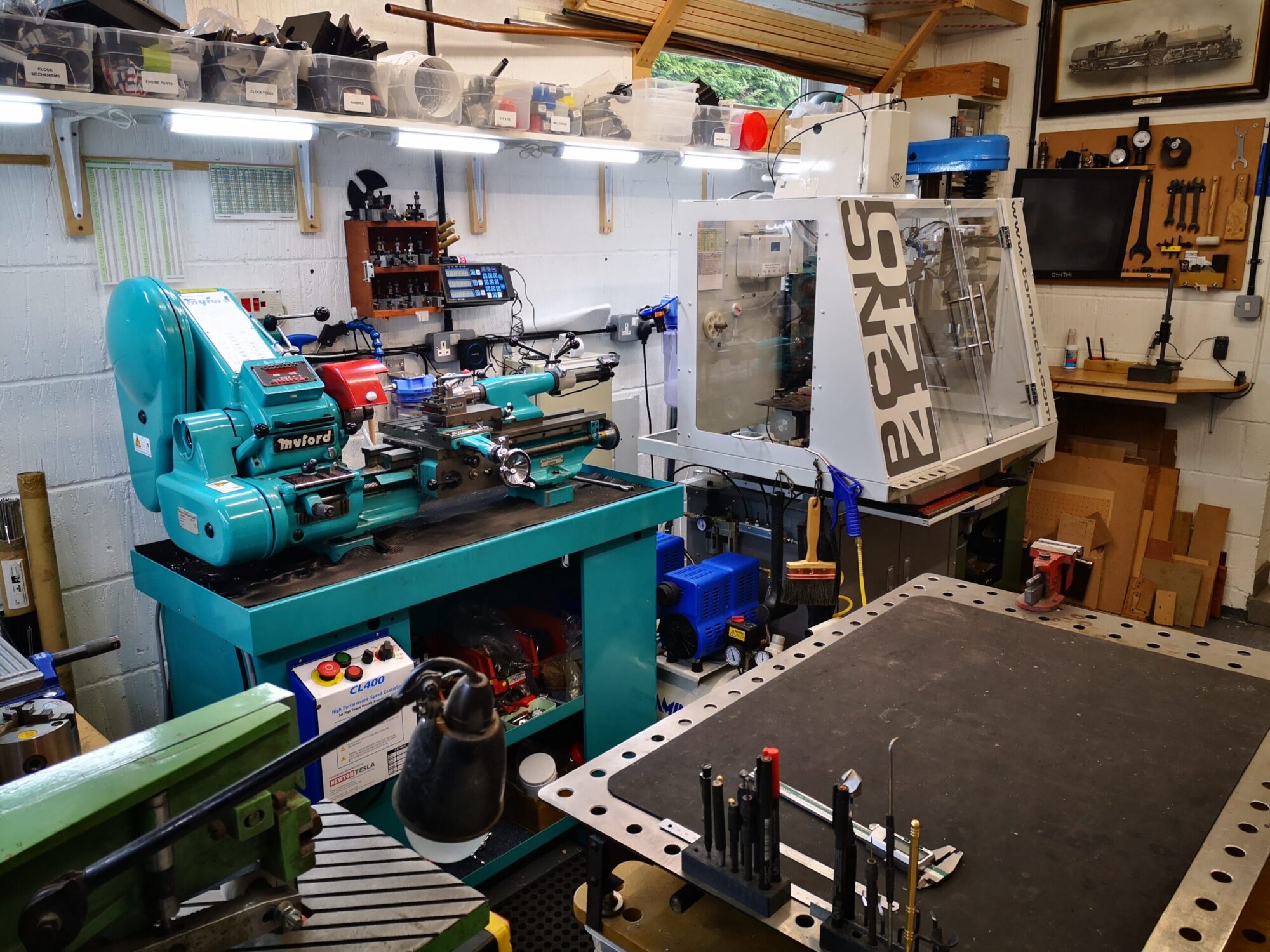
The working circuit was drawn in Fusion Electrical and a printed circuit board layout was created.   Fusion’s Electrical CAM output as Gerber and Epsilon files were converted in FlatCAM to CNC GCode.  The CNC files were than posted to my Tormach PCNC440 to mill the copper traces.

I designed the PCB using through hole components to make assembly easier for my more mature eyesight.

The trigger output from the PCB can feed any 5V coil relay that is rated with contacts capable of feeding the AC voltage and current needed for the heaters.

UPDATE 18/12/2021

Due to demand I have ordered a small quantity of offshore manufactured PCBs for the Dewpoint Monitor.  If you are interested in one then send me an email as per address below.  First come first serve.

UPDATE 1/11/2022

Auto reset code added should the sensor lose connectivity,

New write up is below including the new code

Similar or related subjects : –


Verified by ExactMetrics