A new idea for keeping PCB material flat while milling artworks
The vacuum plate mentioned elsewhere on my blog serves me well when milling printed circuit boards on the Tormach PCNC440. It keeps the PCB material flat and makes the cut widths repeatable when using V cutters.
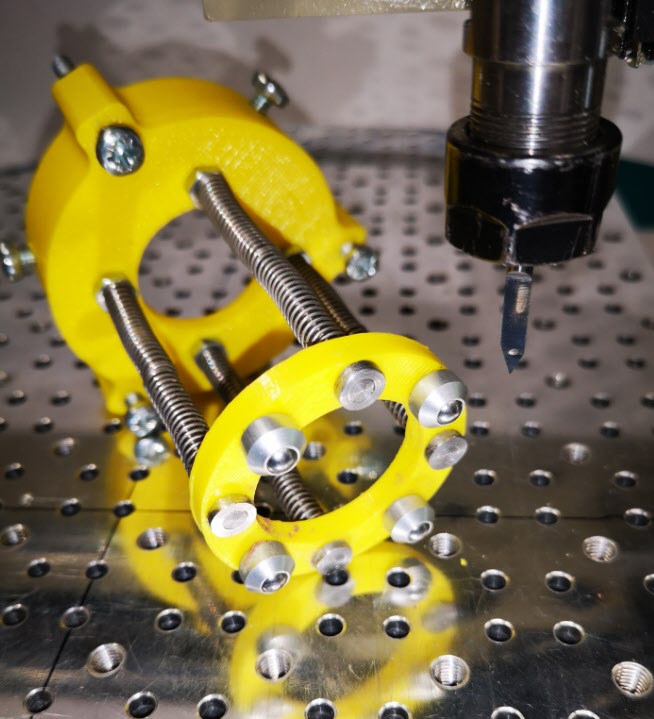
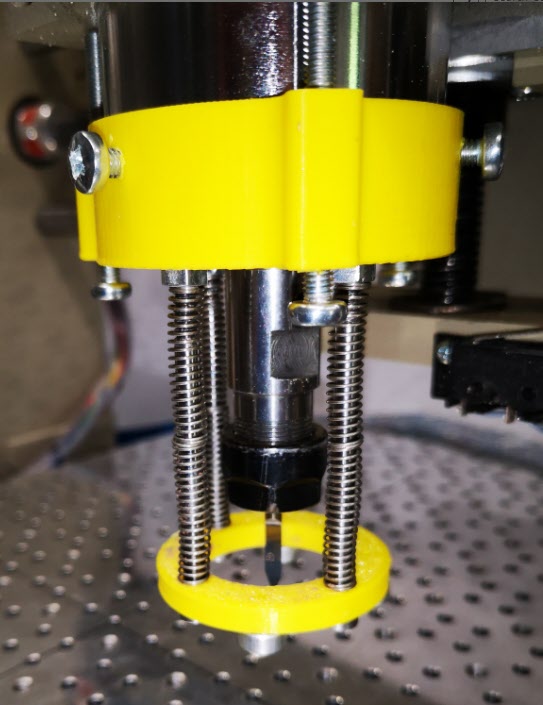
Idle hands and brain during social distancing has produced a possible solution that might be of interest and stimulation to others. It consists of a circular pressure ring that sits around the spindle chuck and tool. There is a second ring that sits on the spindle body connected to the lower ring with rods which have coaxial springs pushing down on the lower ring. The magic is to use mini ball transfer units on the lower ring to press down on the PCB and glide friction free around the PCB as the cutter does its stuff. The assembly is held in place on the spindle with 3 gripping screws. The downward pressure is adjusted by 3 screws that press against the spindle mounting frame.
The ball transfer units come in all sizes and are very common in baggage handling systems at airports and in industrial conveyor systems. The ones I used came from RS and have a 4.8mm ball and a M2 mounting shank.
The prototype was made using 3D printed rings. There is an image below. Apologies for the yellow PLA but finding any PLA at a decent price is very difficult in the present circumstances.
A view of the underside of the lower ring and the four ball transfer units. In the background is the upper ring that sits around the spindle with the pressure adjusting screws and the spindle gripping screws.View of the pressure foot in place on the spindle showing the tension adjusting screws and spindle grip screws
The idea seems to work and has produced some good consistent quality PCB prints. It does have disadvantages in that you need to have a larger PCB blank to allow for the larger footprint of the pressure ring. It is probably only of practical use for PCB milling but then the problem of flatness is less critical in drilling the board and routing the profile.
Lots of activity to be documented and posted but let’s start off with a short note. Not earth shattering but might help someone somewhere.
I had the bright idea of using Micro USBs as a connecting medium on a couple of projects. This was driven by the need for a 5 wire connection. The design was finished and I dug out the Micro USB to Micro USB cable that had been bought in for the project and connected things together. All the LEDs went out on my project circuit board. Gloom.
After buzzing the cable through I found that on a standard Micro USB cable the Sense pin is linked to the Ground pin. There are not 5 independent and isolated cores as you would expect. Just four. What to do ?
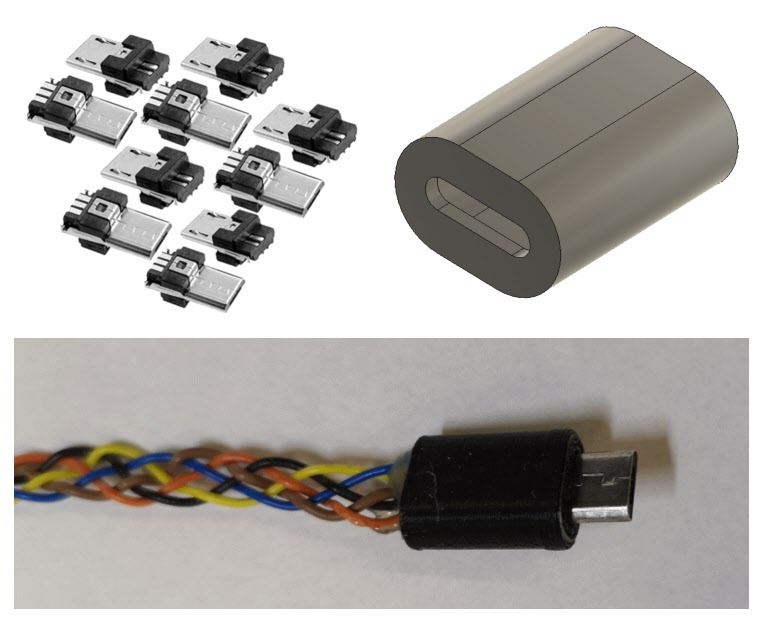
By chance I had some Micro USB connector ends with solder tabs but no shells. I did not have any flexible small diameter cable with 5 cores. After some discussions with my other half she offered to plait 5 independent cables together for me as a cable form. These were soldered to the Micro USB ends. Two small end caps were quickly designed in Fusion 360 and took 10 minutes to print on the 3D printer. Job complete and project back up and running.
Custom Micro USB 5 core cable components showing solder terminal end connectors, 3D printed shell and plaited 5 core cable courtesy of my wife.
(Note for some reason WordPress has redated this post after I did some edits ..)
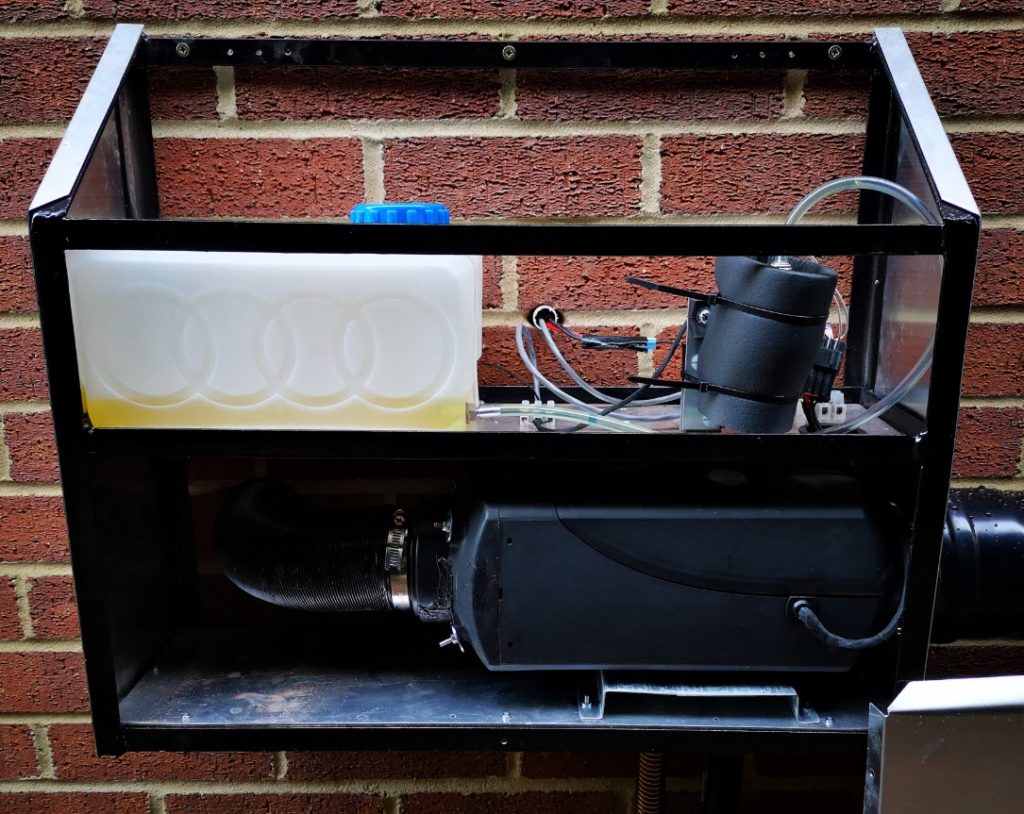
We got the electric bill for last winter and there was a sharp intake of breath … maybe the fan heater had been on too much in the workshop and maybe I did forgot to switch it off once or twice when going to bed … something had to change.
I did some research on diesel heaters as used in motor homes and commercial vehicles and the concept looked like it would meet my needs. I did some calculations on the workshop volume I needed to heat as an empty shell. With my insulation and window content this came to a figure of 3kW. Searching on EBay revealed lots of kits and ready built units so my first thought was to order a ready built one. This duly arrived and I decided to run it up to see what happened.
Actually nothing really happened.
The fan came on ran for a few seconds and then the unit shut down. The controller was showing a severe droop on the supply volts even thought the PSU was rated at 10A. More web reading and comparing notes with other users revealed these units take a serious current surge at switch on while the glow plug is warming up. If it sees a voltage droop it thinks it is in a vehicle and switches off to protect the vehicle supply.
Bigger power supply acquired and plugged in. Still no joy. I then realised I needed to prime the fuel line. Quite a few clicks of the pump later I had a full pipe feeding the device and finally it ran up. The fan was flat out and the pump was clicking like a French grenouille on heat.
And what a stink it made. I guess it was burning off all the manufacturing oils but it was pretty acrid. Finally the fog cleared and I could see the neighbours house and we had heat. Quite a lot of heat. Fiddling with the pump rate brought the heat and the fan rate down and all seemed good. But it was noisy.
There now followed some serious navel contemplation. Did I really want this fire breathing Smaug inside the workshop ? Not really. So how to solve the installation ?
Immediate thought was to mount the unit external on the side wall and feed the warm air from the unit into the workshop and take in air from the outside to warm. The smelly exhaust inlet and outlet would also then be outside. Not a good idea taking outside air and warming it unless I wanted a very rust rich environment.
So air would have to circulate from the workshop, get heated and blown back inside. This means two 80mm holes in the workshop wall plus a power and controller wiring duct of say 20mm. A plan was forming and I could see where the two air ducts could be located.
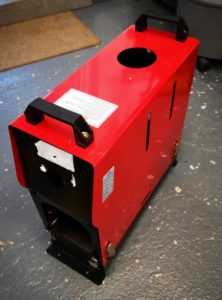
Next problem the (I have to say very horrible) enclosure my ready made heater came in would not protect the contents nor would it last very long sat in the outside air.
New Enclosure
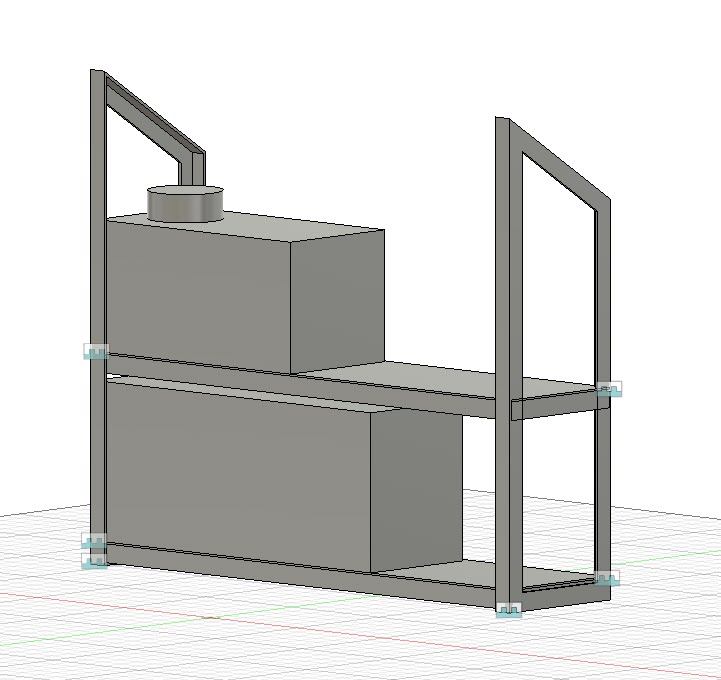
Much Fusion 360 playing later I had a design based on a 20mm angle iron frame and aluminium sheet covering.
Original Fusion 360 model of the enclosure frame less the two top bracing steels
The angle iron and sheet were ordered from Aluminium Warehouse and came very quickly. I was now going to have to grasp the nettle and refresh my TIG welding knowledge to create my first major TIG construction. (I only have TIG as MIG scares the **** out of me).
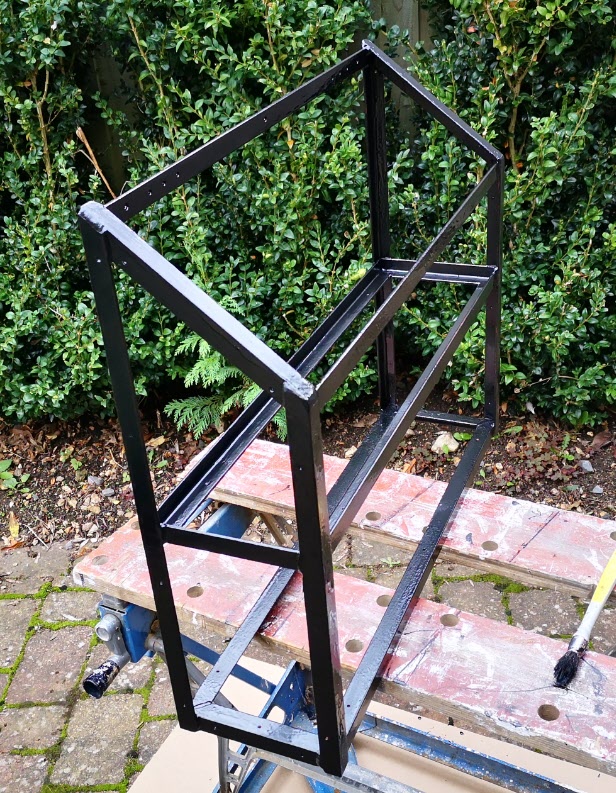
Even though I say it myself I was pretty chuffed with the frame that resulted. Some of the welds were far from ticketable but my angle grinder and Hammerite paint soon covered up my ineptitude.
TIG welded heater angle iron frame after clean up and painting
The aluminium covers also stretched my resources as I don’t have a formal metal bender but I do have some very long lengths of angle iron and a robust vice. Two side walls, a front panel and drop on top cover resulted without any serious clangs. Loving it.
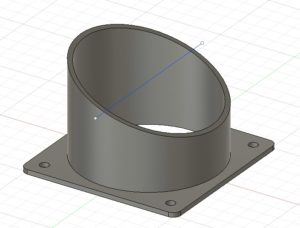
The return air inlet needed an interface of some sort so a Fusion model was created and printed (6 hour print …).
3D printed diesel heater 80mm air inlet cowl which took 6 hours to print
With the enclosure complete, I mounted all the components and ran it up again. The new power supply also failed to do the biz so I decided to go with a meatier version inside the workshop rather than inside the external cabinet.
Installation day loomed. I was very ably assisted by Dave who is a long time friend. We are both cut from the same engineering mould and we usually end up with an interactive plan of action.
First job was to cut the hot air duct hole in the workshop wall. We had a long pilot drill, an EBay 80mm cutter and a SDS drill. Serious grief. The workshop outside brickwork seemed to have a Titanium content. We finally broke through into the cavity and thereafter the inner Thermalite block was like cutting chocolate cake in comparison. First hole finished and more to the point in the correct position.
We now offered the unit to the wall to match the routing of the hot air outlet pipe of the heater. We put a car jack under the unit to keep it in position while we drilled the mounting holes. Holes drilled, we then mounted it on the wall and drilled the cable duct and lined it with a piece of uPVC water pipe.
Re-boxed diesel heater enclosure mounted on the workshop outside wall. The pumps is enclosed in some foam to deaden the clicks.
The circulating return air from the workshop was to come through the workshop wall and back to the heater from just over a meter away. I had a suitable length of 80mm spiral metal ducting for the air return and a mating right angle joint to route this through the wall. We marked off the duct hole position and drilled out a second 80mm hole (more grief, less dust as we damped it down, and hammer and chisel when we got fed up with the useless 80mm cutter).
The Cunning Plan
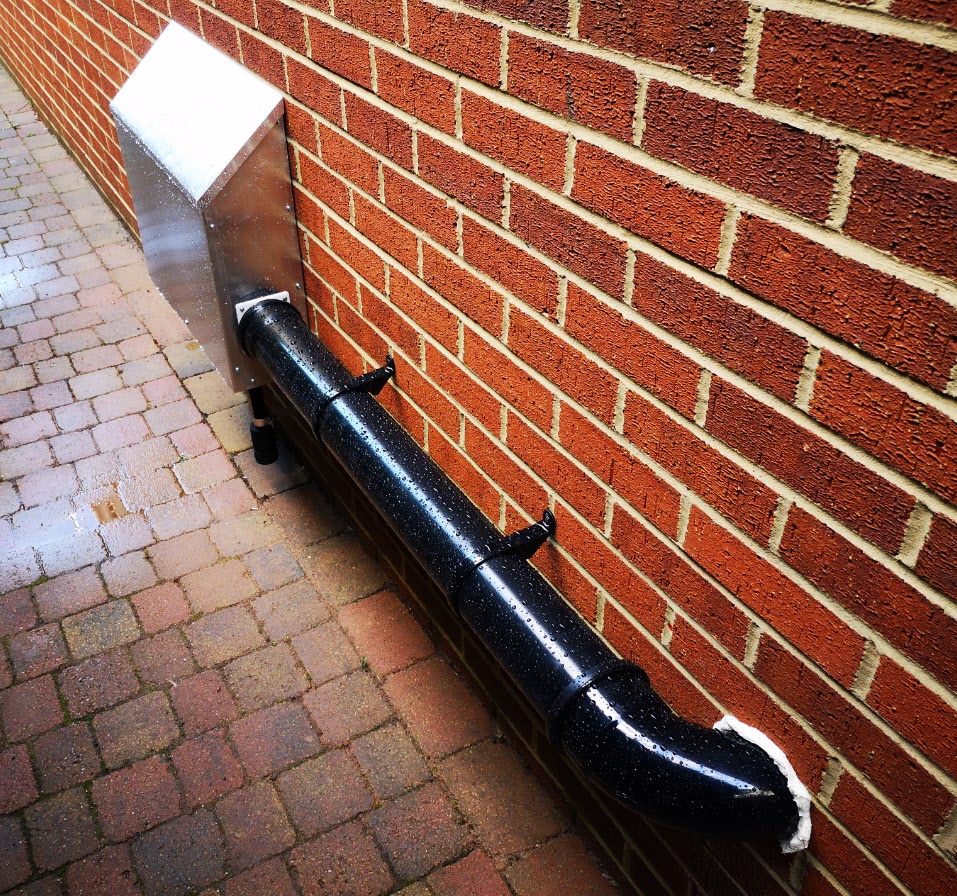
I didn’t want the metal spiral ducting exposed to the elements and also saw it as a source of heat loss. There is no point in heating up the workshop and then send the warmer air outside to lose heat on its way back to the heater. The solution was to buy a standard 1m length of 110mm soil pipe and a right angle joint with two mounting clips from Wickes. We wrapped the 80mm spiral duct in bubble wrap (quite a few turns) to fill the space inside the 110mm soil pipe to make a coaxial structure. As luck would have it the spacing to the wall of the soil pipe was pretty much ideal to use the standard pipe clips. We did however have to cut down the right angle soil pipe connector to get it flush to the wall. It then got a dose of squirty foam to seal it.
Finished diesel heater enclosure with coaxial inlet duct using 110mm soil pipework and fittings. The 80mm internal duct is wrapped in bubble wrap.
We were both very pleased with the result. As Dave commented it looked better than a professional install would have done.
This was the bulk of outside work done apart from mounting the exhaust inlet and outlet pipes. Inside we had the hot in wall vent grill to fix and the controller wiring.
I still haven’t decided where to route the outward air duct but currently it sits sucking air from under the Myford Super 7 cabinet. I am not comfortable with this (the location rather than the potential draft around my ankles) as it will tend to suck up workshop dust and particles. Some form of filter will be needed. As yet I haven’t mounted the new power supply on the inside wall.
We ran it up and I can describe it as toasty warm. At least one good reason to look forward to winter, probably the only one.
Finally thanks to Dave for helping. Also thanks to Steve Niebel for detailing his experiences with a similar unit.
If you want to know more about the heaters then the best source I found on YouTube was Dave McK 47
Anyone wanting a very basic indoor housing for their heater components should send me a message ….. and soon …. otherwise it is going in a skip (but I might save the handles).
Update December 2021
The heater has now been installed and running for over 2 years. It is excellent in making the workshop more than comfortable in winter months. A few comments to address feedback I have had on this post : –
The controller cable was extended into the workshop by simply cutting the supplied cable and splicing in an extension length of 3 core cable.
I now run a mix of diesel and household heating oil (approx 50/50) which does not seem to degrade performance. That being said the brickwork near the exhaust is now somewhat black from the fumes. I don’t get any smell in the workshop with the pipework routing as described.
Fuel consumption is around 5 litres per week if I run it every day for four hours.
I fitted a simple mesh filter over the air intake which remains located under the Myford stand.
With hindsight there is more than enough hot air generated that I could have branched the feed to my office next to the workshop.
Overall this was probably one of my best projects for the knock on benefit.
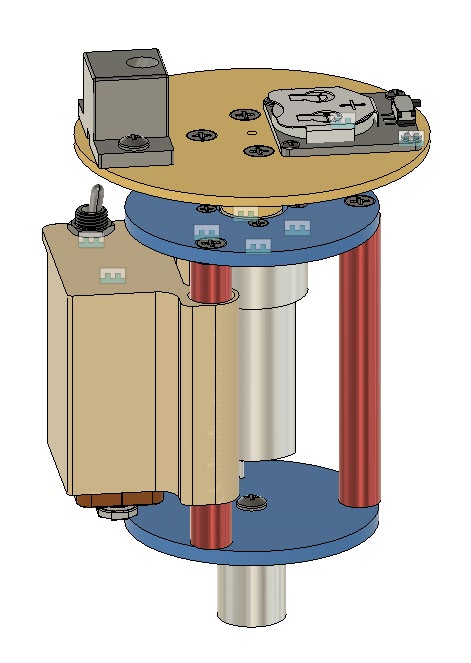
One of my favourite additions to the workshop has been a laser centring tool for use on my Tormach PCNC milling machine. The tool consists of a low cost laser diode mounted on a 3D printed disc and with a 19mm steel shaft. The tool is held in the Tormach spindle power drawbar. The laser is angled inwards towards the spindle axis at approximately 20 degrees. The 3D print has facilities for a battery supply and ON/OFF switch such that when the laser disc is pulled into the power tool bar collet it switches on the diode.
In use, as the spindle is raised or lowered, the rotating diode creates a circle of light on the milling table which can be used to locate and centre the spindle on features of the item being machined. This might be to locate the centre of a hole or the centre of a block depending on need.
I recently had the need to use my four jaw centring chuck on my Myford lathe. Usually I duck and dive to avoid having to use the 4 jaw as I find it frustrating to set up. This recent bout of frustration lead me to wonder if I could adapt my laser centring tool for use on the lathe such that it would give me a guide ring of light to show where the material was sitting relative to chuck centre.
On the milling version the laser rotates and the job stays fixed. On a lathe version this would be similar. The chuck would be stationary and the laser would rotate in the tailstock.
This is nothing magic but worth a mention. Being fundamentally lazy I don’t like to assemble and solder electronic multi-way connectors. There is never enough room to work on the contacts and the cables never lay up how you would like them to. This could have course be a function of my eyesight ..
I am currently working on boxing and installing the Tormach USB Expansion Board which has a USB connector interface. I wanted the cable to pass through some form of gland into the box but didn’t want to cut a standard USB cable and remake the connector at one end of the other.
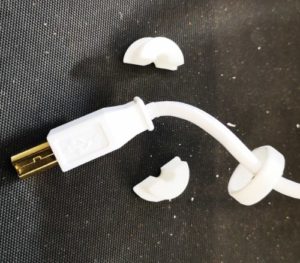
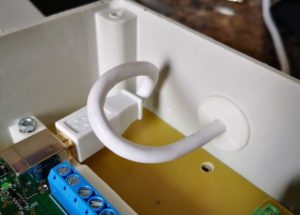
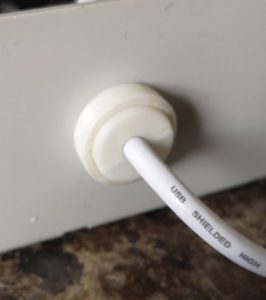
After some head scratching I came up with the following simple cable gland/cable grip. It is nothing revolutionary but made life easy and the parts only took 20 minutes to design in Fusion 360 and then 3D print on the Sindoh 3DWOX.
It has two identical semicircular halves that hold the cable and there is a ring that pushes over these on the outside of the box. A small flange holds these in place on the inside of the box. The hole in the box and the ring inside diameter are both 16mm to allow the USB connector largest dimension to pass through. This is also one of the standard cut rings on a cone cut hole drill which makes cutting the hole in the box very straightforward.
The component parts (two halves and the retaining ring)Inside view of the gland showing the retaining shoulder on the two halvesOutside view of the cable gland showing the retaining ring
Not rocket science but you never know it might come in useful and the dimensions can be tweaked to suit other cables and connectors. Similar or related subjects : –